 Redline
Summary: Diff
A diff compares two versions of a project, including equipment information and drawing geometry.
What you are comparing
Summary: Diff compares the last saved version with the current drawing. File comparisons use two .wpr files; history reviews compare the current drawing with the target revision.
The two sides identify the versions being compared. CURRENT-to-TARGET in a history review describes what restoring the target would change.
A change in placement
This device has moved. The comparison shows its old and new positions, not two different pieces of equipment.
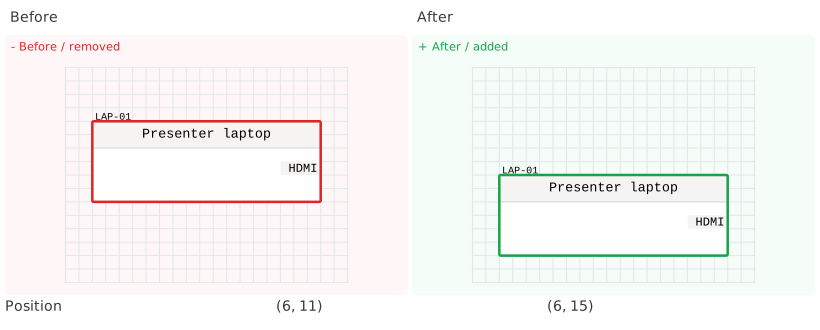
A connected cable may also change route while remaining attached to the same physical ports.
A change you cannot see on paper
A user field can change while both previews look identical. Notes, IDs, and other properties are compared even when they do not appear on the drawing.
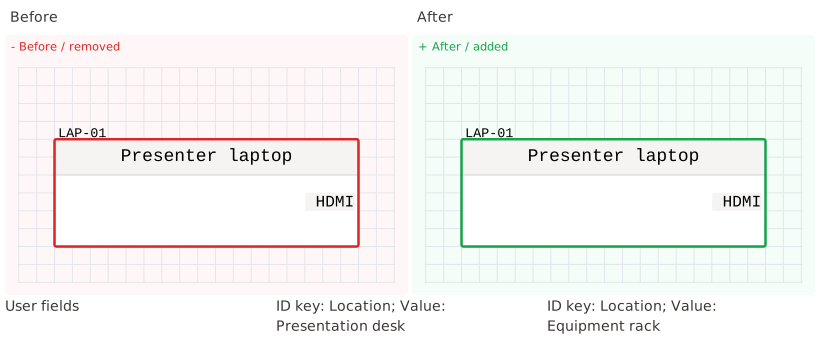
The property details show the previous and new values.
Reading the comparison
Added, removed, and modified items describe the difference between the sides. The viewer can show the two previews separately or combine their presentation. Filtering searches context, property names, and displayed old and new values.
A diff does not save, merge, open, or restore anything on its own.
Comparing files from another engineer
In Projects, select a project and compare it with another file. LEFT and RIGHT identify their paths.
Opening one side loads that version; it does not merge changes from both.
Reviewing before a destructive choice
Closing unsaved work and restoring history can show a comparison before the save, discard, or restore choice.
See Project files, saving, and recovery for autosave recovery and Undo, branches, and local history for history restoration.