 Redline
Frontmatter and title blocks
Frontmatter is the information band along a page: a logo, drawing title, sheet number, notes, and other document information. Its layout is shared across the project, while some of its content can differ by page.
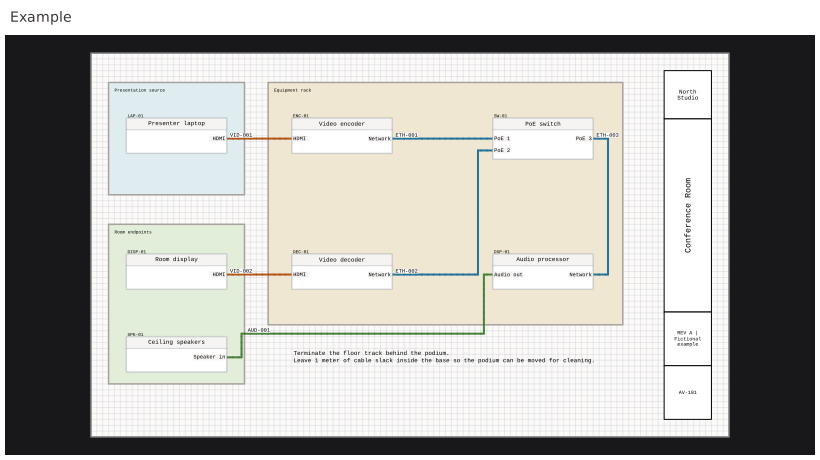
Open Frontmatter to inspect the pages and their frontmatter. The band can sit at the left, right, top, or bottom of a page. Its thickness is measured in grid squares, with a shared value and an optional page override.
Shared structure, local content
Box names, order, content types, and appearance are shared. Removing a box removes it from the project layout, not just the current page.
Shared text suits company information. Page text suits sheet-specific notes. An image has shared artwork with optional page-specific overrides.
Text that belongs to one sheet
Page text stores an independent value for each page in the same shared box. Revision notes can differ while keeping the same position and appearance. A page without a value can have an empty box.
The page inventory in Summary: Nodes offers another view of these values. Shared text there is still shared: editing it in one page row changes the common content, not a private copy for that sheet.
Generated fields
Text can contain {{project.name}}, {{page.name}}, {{page.slug}}, and {{date}}. The same shared text can therefore print a different page title or ID on each sheet. The date updates when the drawing is rendered or exported; it is not a saved revision date.
The token insertion controls append the exact spelling to the text. You can also type it yourself. Unsupported names remain literal text; user fields are not automatically available as tokens. Formatting follows the style at the token's opening brace.
Logos and page overrides
An image box fits its artwork with the aspect ratio preserved. A page can use the shared image, substitute its own image, or hide the image locally. Replacing shared artwork does not overwrite a page-specific override.
Restoring the shared image removes that page's override.
Proportions and alignment
Relative box weights divide the available band length. A larger weight gives that box more room; it is not a fixed physical height. On top and bottom bands, the weights divide width even if the field is called Relative height.
Padding, alignment, font size, quarter-turn rotation, and image fit place the content within each box. Font behavior is explained in Fonts, formatting, and drawing appearance.
Font size across pages
Frontmatter font sizes are physical point sizes, independent of page density. An 18-point field stays 18 points throughout the document, even when sheets use different drawing-grid densities. This also applies to font sizes set within formatted text.
In the editor, frontmatter text can look larger or smaller relative to the grid and drawing objects when you compare pages at different densities or zoom levels. That is expected: the text is normalized to the document's printed size, not to each page's drawing grid. Changing page density does not change its size on paper or in the exported PDF.